Web app · Field service SaaSLive and in daily use
ApplianceRepairVault
The all-in-one dashboard for appliance repair companies: booking, scheduling, dispatch, routes, parts, and invoices in one place. Live and in daily use.
Visit appliancerepairvault.com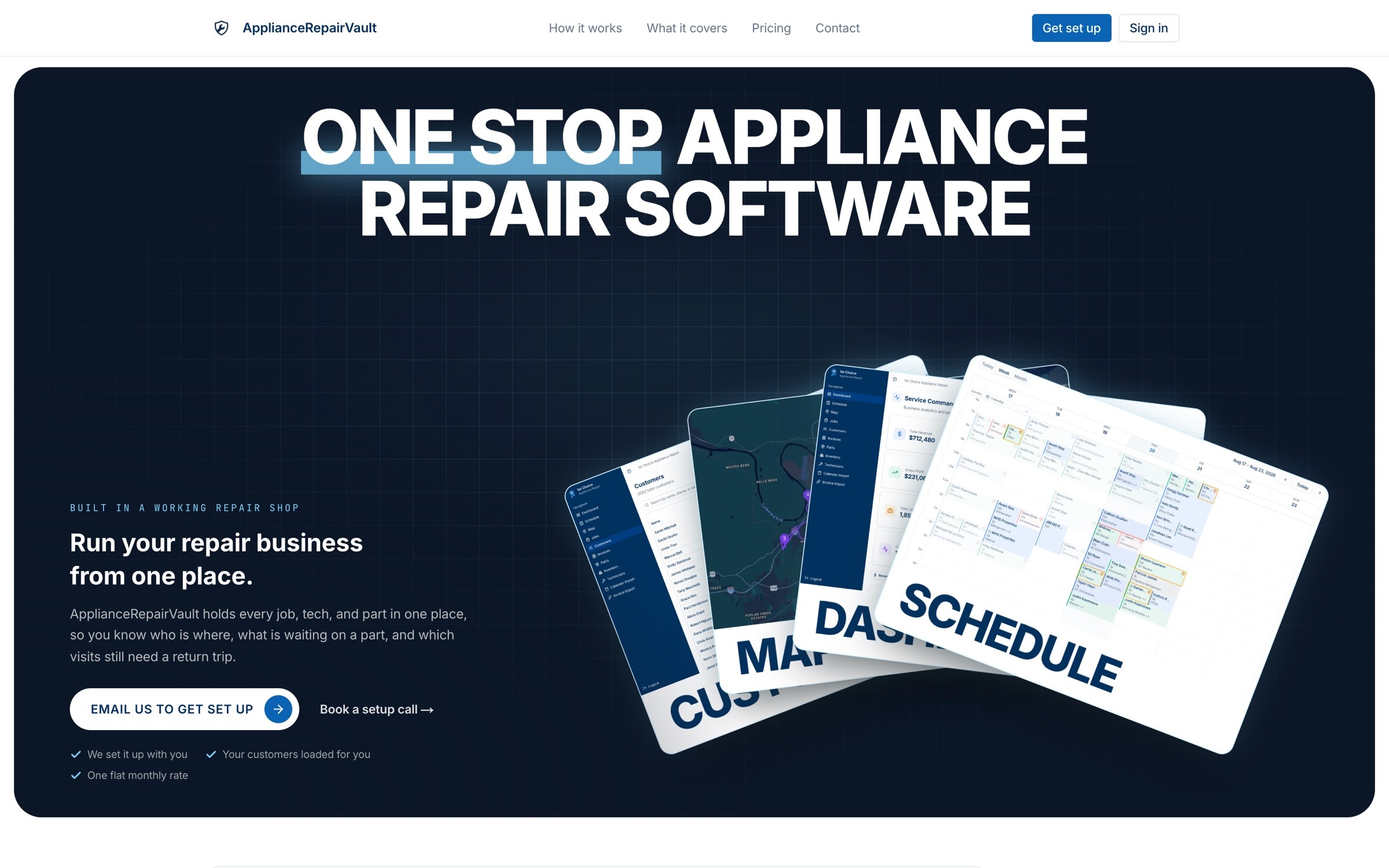
- Type
- Full stack app
- Started
- 2026
- What we did
- Product design, Front end, Backend, Maps and routing, AI assistant
- Built with
- Next.js, TypeScript, Tailwind CSS, shadcn/ui, Supabase, Google Maps Platform
A repair shop runs on calls, texts, a paper schedule, and a truck full of parts. ApplianceRepairVault needed to put every job, tech, part, and invoice in one place, with an office view and a phone view for the techs.
By the numbers
- Commits
- 395
- API routes
- 73
- Database migrations
- 86
- Test files
- 36
Counted from the project's own repo on 2026-11-22.
One repair job, end to end.
How one real job moves through the system, step by step, and which part of the system does each step.
- 01Booking
The job is booked
A customer books online, or the desk books it in one screen with suggested time slots.
- 02Google Maps
It lands on a route
The job joins a tech's route, with real drive times between stops.
- 03Tech view
The tech does the work
The tech sees the day on a phone, and adds photos and parts.
- 04API routes
The office sends the invoice
The invoice is drafted, finalized, and emailed. Every route checks the shop.
- 05Customer page
The customer opens it
Each invoice has its own page, by link.
- 06Cron jobs
The owner gets the numbers
Reports go out each hour, and the week ahead goes out each night.
What we designed.
The pages and pieces we drew and built for this project, from the first screen to the last.
- 01
A hand of screens
Four real screens of the app fan out under the title like a hand of cards: customers, the map, the dashboard, and the schedule.
- 02
One vault
An isometric line drawing where six tiles (calls, the schedule, jobs, parts, invoices, and payments) each send light into one vault tower.
- 03
Book in one screen
Customer, job, and time in three columns with a sticky Book bar, and suggested time slots.
- 04
Schedule and map
Day, week, and month views. Each tech has a route line in their own color with numbered stops.
- 05
The tech's day
A phone view for the field: today's jobs, photos, parts, and notes.
- 06
Dashboard
Key numbers, a heatmap of jobs, and charts by revenue, customer, and tech. Follow-ups show as yellow notes.
- 07
Pages for each shop
Each shop gets its own landing page, an online booking page with a QR code, and an invoice page for its customers.
Colors
- #02315E
- #0B63B4
- #0f172a
- #64748b
- #f8fafc
Type
- Inter
- JetBrains Mono
How it's built.
This one is more than a website. Here is the system behind it, and the choices that make it hold up.
The system
Screens
- Office appSchedule, map, jobs, and invoices
- Tech viewThe day, on a phone
- Shop pagesBooking and invoices for each shop
Server
- ProxySends each subdomain to its shop
- API routesEach one checks the shop from the session
- Cron jobsReports and the nightly email
Data
- PostgresThe browser key is blocked on every table
- AuthFour roles: admin, owner, desk, and tech
- Rate limitsKept in Postgres
Outside services it calls
- Google Maps PlatformGeocoding, drive times, and routes
- ResendInvoices and reports
- GroqThe read-only assistant
Choices that matter
- 01
Every shop has its own address
Each shop runs at its own subdomain. The app checks the session against the address, so a login for one shop can't open another.
- 02
Limits that survive restarts
Rate limits live in Postgres, not in memory, so they hold across server restarts.
- 03
Invites used once
Invite links work one time, and the database keeps only a hash of each one.
Start a project
Want one like it?
Book a 30-minute call. We'll talk through the idea and tell you straight if we're the right studio to build it.
Or email ben@nashvillesoftwareco.com